Window layouts for App Groups in TabLauncher Pro: each group can now remember a window layout of its own. Arrange the group’s windows and choose “Save Window Layout” from the group’s menu — clicking the group then puts every window back at that size and position, even windows that are already on screen. The same window can have a different size in each group, and a window you add to a group starts out where it was when you added it. Layouts are kept separately for each set of displays
TabLauncher Pro now includes the extra built-in scripts the App Store versions can’t run, such as ejecting disks and shutting down the Mac
Web-address icons can now open in the browser of your choice: pick it under “Set to Open With” in the icon’s menu
A tab moved to another side of the screen keeps its rows and the arrangement of its items
A tab dragged to an empty edge of the screen keeps all its settings
In a tab with several rows, items you add land in the row where you drop them or where you clicked
Tabs on the top or right edge no longer block clicks on the desktop right after they close
Links dragged in from Safari keep their exact web address
Web-address icons no longer disappear when you drag them
Script icons made from a built-in script you haven’t changed now run its latest version
Testing a script in Preferences now also shows errors that happen while it runs
If an item’s file has been moved to the Trash, clicking it now tells you it can’t be found, instead of asking for access to a folder
TabLauncher no longer hangs when you quit it or load a backup right after a tab closes
TabLauncher uses less energy while its tabs are closed
Recent Items: a Recently Modified tab can now show your recent applications, documents or servers instead of a folder — like Recent Items in the Apple menu, always one move away. Pick it with the new “Show:” menu when you add the tab, or later in the tab’s Special options
In the App Store versions, the first Recent Documents tab asks once for access to your Home folder, so it can see what you open
Fixed: after waking from sleep, the tabs could disappear until TabLauncher was restarted
Folder contents menus are now sorted the way the Finder sorts them in the App Store versions too (TabLauncher Pro has had it since 3.2.0.1)
App Groups: drag an item onto another one and hold it there for a moment, and the two become a group; drop more items onto it to add them. One click on the group opens everything in it — your whole project in one go
Right-click an empty spot of the tab for “New Group from Apps on This Screen”; a group gets an “Add Apps on This Screen” command of its own
Edit a group in its options: reorder the members, take one out (it goes back to the tab), or ungroup everything
TabLauncher Pro: groups hold windows, not just apps. “New Group from Windows on This Screen” and “Add Windows on This Screen” collect the actual windows. A group finds them again even after the app or the Mac restarts, and reopens a closed window’s document
TabLauncher Pro: a group can minimize every other window on its screen before bringing its own forward, and windows sitting on another display come over to the launcher’s screen
Rearranging icons feels like on the iPhone now
A Body Padding slider in the Appearance Studio sets the side margins around the icons — tighten them, or let the icons overhang the body
Fixed: on macOS 27, TabLauncher could fail to open for some people
Dropping a file onto an app icon opens the file with that app again, and dropping it onto a folder icon sends it into the folder — instead of just adding the file to the tab
The Windows tab’s “App icons instead of previews” option no longer hides when Screen Recording permission is missing — it’s exactly the mode that needs no captures
Item names no longer blink out while you move the pointer between icons — the name hands straight over to the next item
Hovering a tab now works anywhere on the tab, not only over its title
Preferences > Tabs > Icons: the Position, Size and Spacing sliders now follow the tab you have selected
Window previews are steadier, including a fix for a crash
The Windows tab — the special tab that lists the windows of every running app — is now a TabLauncher Pro feature. Only an app outside the sandbox can bring another app’s window forward, so adding one moved to Pro, the free companion for TabLauncher customers (see the PRO section on the TabLauncher page). There, clicking a window raises it instantly through the Accessibility API, tabbed-away windows included
App icons instead of previews — a Windows tab option, at Add Special Tabs > Windows and on the Special pane of a tab you already have: each window shows its app’s icon instead of a live thumbnail, so the tab takes no screen captures at all and the recording indicator stays off
Multiple rows of icons — give the launcher up to 6 rows with the new Rows slider in Preferences > Body, and drag any icon onto any row
Free item docking — the new Items option (Centered / Free, also in Preferences > Body) lets you place icons on any spot of the grid, iOS style; the tab grows and shrinks to fit your arrangement
When a tab outgrows the screen, the scroll wheel pans the items
Upgrading from version 2 now brings your tabs and settings over automatically
If 3.0 already greeted you with default tabs, don’t worry — your old setup was never deleted: open Preferences > General and press Load, then choose your old settings folder to bring everything back
Backup files (.tabl) now show their own icon and can be restored with a double-click
Lock Tab -> If a tab is locked, it can’t be dragged, icons also can’t be dragged, and files dragged from finder can only be dropped on existing icons (performing an “Open with” operation)
Stand-alone Tab -> If a tab is stand-alone, it will work independent of all other tabs, so it can be opened while other tabs on the same edge remain closed.
It’s now possible to delete all text from the icons name.
Version 2.5.1 is now available on the Mac AppStore. What’s new:
Fixed a crash that could happen when running scripts.
Fixed an issue that could cause TabLauncher to become unresponsive when set to Always Open.
More responsive at start up.
Other minor fixes.
Many thanks to the users that have reported these issues to us. Please don’t be shy, if you have any issues with TabLauncher, immediately report it to us at info@oktoid.org
Version 2.5 is now available on the Mac AppStore. The new key features are:
Greatly improved energy usage, now uses 0% when docked.
Configuration folder now takes much less disk space.
New features for Icons
Reusable images, every time you customize an icon with an image, the image will be displayed on a list and can be easily used on other icons. There are some images already included that can be used as the base for making your own icons.
Advanced options, run any item with several system events, such as before system goes to sleep, etc.
Also options to quit apps with system events.
Right click menu now has an option to add custom icons (this icons are applescript files located on ~/Library/TabLauncher/Scripts)
You can create more custom icons using your own applescripts, or scripts that you find on the web.
A script can be added to display information on the Icon’s badge, such as the number of unread messages, etc.
The icon’s name can also be customized, for example to display the name of a music playing on iTunes.
You can also customize the icon’s right click menu. For example the Trash icon now has options to eject external drives, or only the virtual drives.
It’s now possible to set a timer for each item in your tabs.
TabLauncher is now scriptable. You can modify some or all of your items at once using applescripts. (For example to set the size of all icons at once, you can run a simple script like this: tell application "TabLauncher" to set icons size of tabs to 40
New option to make TabLauncher stay open until you click on an icon or tab.
Apple rejected our “lite” version again. Because Apple doesn't allow "trial" versions. Even though this is not a trial.
The “lite” version is actually fully functional, there are no banners, no time limit. Anyone can use it for free for as long as they like. We believe many users won’t even need more than 3 tabs. Actually we suggest removing one of the initial tabs and experiment with the “special tabs”.
So, we have given up updating the free version on the Mac App Store. Sorry about this Snow Leopard users, the free version on the Mac App Store will continue to require Lion.
Anyway, we have just added the download button on the home page, so feel free to download it.
Window preview. Placing the mouse pointer over an app currently on your tabs will display the app's window preview.
Added "Special Tab Windows". Shows a small preview of all applications windows. You can also set to display only off screen or minimized windows.
Badge on the Mail application.
Improved Performance.
Other improvements and bug fixes.
Unfortunately it’s impossible to implement a decent way to bring a specific window to front, if it’s not on the current desktop (mission control’s space). Also the control we have over “mission control” is very limited. Apple has been removing the control developers used to have over the system. If they continue to block us even more, I fear applications like TabLauncher will no longer work in the future. Let's hope the guys at Apple realize that the community has much to offer, if they let us!
We are sorry, but for now clicking on window icons won’t work on all cases. We hope this can be fixed in the future.
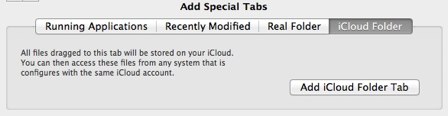
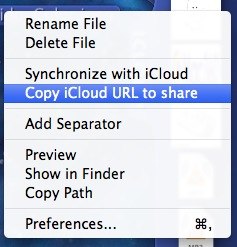
We are having some trouble with the last update, because we've added the "Special iCloud Folder Tab". They took about a month to review it and finally they rejected. So, we will insist a bit more with Apple but probably we have to remove this feature. I don't know why they made the iCloud and then don't let people use it to store files...
Multiple monitor support. Just drag to any monitor.
Indication light for running applications.
Option to Hide, Quit and Force Quit running applications.
Drag icons out to remove from TabLauncher.
TabLauncher will now keep track of files even if moved or renamed.
Drag links from any web browser directly to TabLauncher.
Option to turn off/on the sound.
Other improvements.
Version 1.2 was supposed to have a lot more options, special effects, animations and so on. But it’s taking longer than expected to implement the new graphics engine. We didn’t want to keep people waiting for this features, so we had to release this intermediate version.
Sorry everyone, but as promised the free days are over. It was good while it lasted, and we hope everyone got a chance to download TabLauncher for free!
However, the happy days aren’t over yet!!
We’ve decided to continue the launching promotion! It will stay at $0.99 until all the major features are live at the Mac App Store.