



For Mac · macOS 12 or later

It’s better
with tabs.

TabLauncher keeps your favorite apps, files, folders and web pages one flick of the mouse away, in colorful tabs that sit quietly on any edge of your screen until you need them.

Already a customer? TabLauncher Pro is free for you.

Hover the tabs, or pick a shape. In the app you can sculpt your own.

Version 3

A complete visual rebirth.

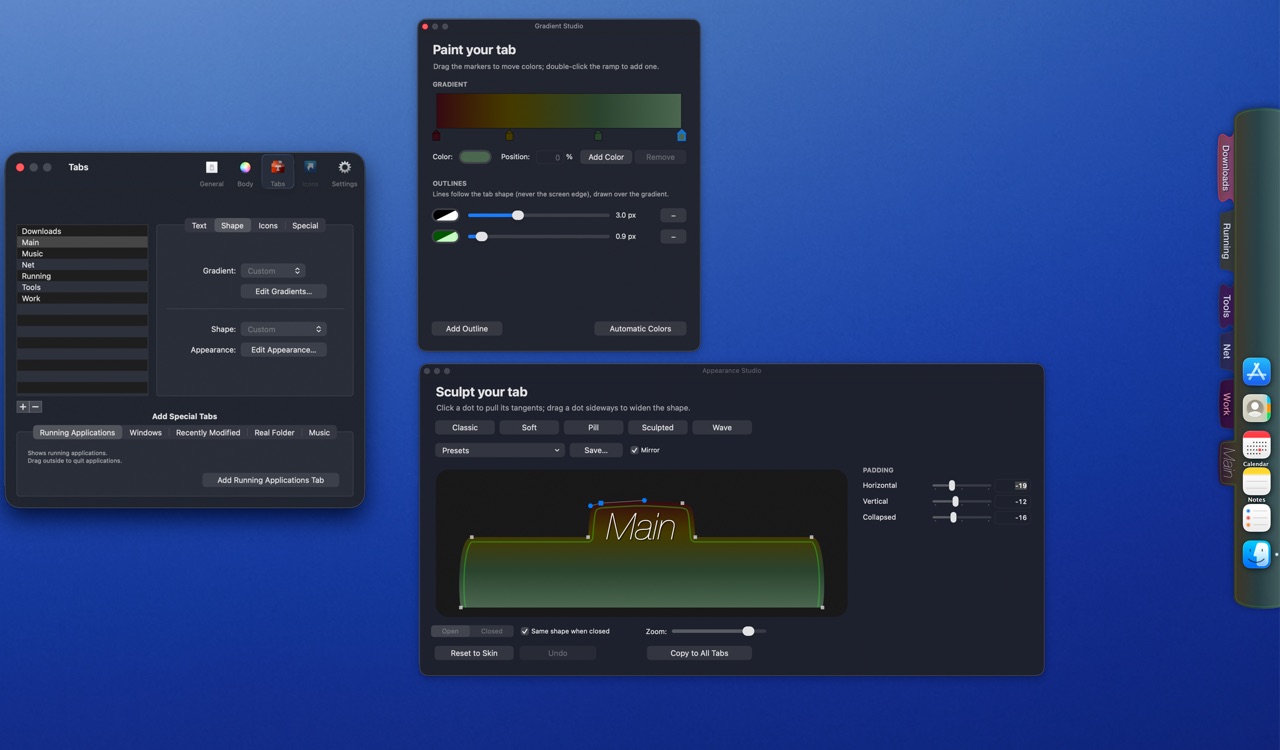
Tabs used to be static. Now they are living, organic shapes you can sculpt. Paint each tab with multi-color gradients and outlines, and watch everything move: tabs morph open and closed, and icons glide apart to welcome a drop.

TabLauncher's Tabs preferences, Gradient Studio and Appearance Studio, with tabs docked on the right edge of the screen
The Gradient Studio and the Appearance Studio, with tabs docked on the right edge.

Design it your way

  • Sculpt the exact shape of your tabs: corners, shoulders, curves. Every dot and tangent is draggable.
  • Gradients with as many color stops as you like, plus ready-made recipes based on your tab’s color.
  • Outlines, shadows, transparency, fonts and label styles.
  • Five hand-tuned shape presets, and your own presets to save and reuse.

Stay organized

  • Unlimited tabs on any edge of any screen. Every edge remembers its own layout, with a gap for the camera on modern MacBooks.
  • Special tabs: running apps, recent files and apps, real folders that stay in sync, and a music player.
  • App Groups: one click opens a whole project.
  • Up to six rows of icons, placed anywhere on the grid.
  • Import your Dock in one click, spacers included.

Make it work like you do

  • Open it your way: rest the pointer at the edge, hover a tab, click, or keep it always open.
  • Close it after a delay, or when you click an icon, a tab or anywhere outside.
  • Auto-hide completely, leaving elegant gradient markers where your tabs sleep.
  • Global keyboard shortcuts, AppleScripts per icon, and triggers that launch or quit apps on wake, login or a timer.

Three editions

Pick your TabLauncher.

TabLauncher Lite

Free

Every feature of the full version, limited to three tabs, with no limit on how many items you put in them.

  • Free for as long as you like
  • All the features of TabLauncher
  • Three tabs, as many items as you want
Get Lite free
PRO

TabLauncher Pro

Free for TabLauncher customers

The same TabLauncher, distributed outside the App Store, so it can do things a sandboxed app isn’t allowed to.

  • The Windows tab
  • Quit apps from the launcher
  • Window layouts and window groups
  • Updates itself
Download Pro

TabLauncher and TabLauncher Lite need macOS 12 or later. Pro needs TabLauncher from the Mac App Store on the same Mac.

TabLauncher Pro

Free for TabLauncher customers.

Pro is the same TabLauncher, distributed outside the App Store, so it can do the things a sandboxed app is not allowed to do.

The Windows tab

A special tab that lists the windows of every running app, so you can jump straight to a window instead of hunting for it. With Accessibility access, Pro raises the exact window instantly, even one tabbed away or on another desktop. Prefer no screen captures? Show app icons instead of live previews.

Quit apps from the launcher

Right-click an app’s icon to quit it, or force quit it if it hangs. Or right-click a tab and quit every running app on it at once.

Window Layout (Beta)

An icon that remembers where all your windows are. Click it once to take a snapshot; click it again whenever things get messy, and every window moves back to its place: position, size and desktop.

Groups that hold windows

App Groups can collect the actual windows on a screen and find them again after a restart. Each group can remember a window layout of its own.

More built-in scripts

Scripts the App Store versions can’t run, such as ejecting disks and shutting down the Mac.

It keeps itself up to date

Pro doesn’t come from the App Store, so it updates itself: right-click a tab and choose Check for Updates…

To use it, TabLauncher from the Mac App Store must be installed on your Mac. On first run Pro offers to take over your existing tabs and settings. Keep the App Store version installed, but run only one of the two.

Download TabLauncher Pro